

Botlabs Bench
A free, portable PC benchmark for Windows and Linux. It’s one file and needs no installer: download it, run it, and it tests your CPU, memory, storage, graphics and network, then saves a full report next to the app.
Pick Quick (10 minutes), Detailed (1 hour), or Custom, where you choose the tests and how long they run. While it runs you see live progress bars and graphs, and you can stop at any time without losing the results so far. Reports come out as HTML with charts, plus CSV, Excel and JSON. It’s good for checking a new or upgraded PC, spotting thermal throttling, and comparing machines or before/after runs side by side. It uses the same CPU test on Windows and Linux, so results are comparable across both.
Features
- CPU: single-core, all-core, and a sustained throttling check (same algorithm on Windows and Linux)
- Memory: bandwidth, latency, error check
- Disk: sequential and 4K random read/write, with drive selection
- GPU: built-in OpenGL test that works on Intel, AMD and NVIDIA
- Network: internet download speed (Cloudflare) plus LAN/NAS copy test
- Modes: Quick (10 min), Detailed (1 hr), Custom (pick tests, set a duration or do a single pass)
- Live progress bars, percentages and graphs, and a Stop button that keeps partial results
- Reports in HTML (with charts), CSV, XLSX and JSON, saved to a BenchResults folder next to the app
- Compare view to put runs side by side (warns when versions differ)
- Headless command-line mode for scripting
- Temperatures on Linux; not available on Windows yet
Requirements
- Windows: Windows 10/11 64-bit — single portable
.exe - Linux: x86_64 AppImage — glibc 2.38 or newer, OpenGL-capable GPU driver. Tested on CachyOS (Plasma Wayland, RTX 3090) and on a generic Linux VM.
- The disk test uses a temp file of 64–2048 MB (user-selectable) and needs that much free space. Minimum RAM/disk is not formally specified.
Install & run
Windows
- Download
BotlabsBench.exeand double-click it. - Windows SmartScreen may warn because it’s unsigned — choose More info → Run anyway.
- Results go to a
BenchResultsfolder next to the exe.
Linux
- Download the AppImage.
chmod +x BotlabsBench-x86_64.AppImage./BotlabsBench-x86_64.AppImage- Results go to a
BenchResultsfolder next to the AppImage.
Headless
--headless --mode custom --tests cpu,memory,disk,network,gpu --single-passAlso supports --duration-sec N and --disk-drive PATH.
Downloads
Downloads are hosted on GitHub Releases. Source code: botlabsusa/botlabs-bench.
Changelog
- 1.1.1 Linux · Nov 1, 2026
-
- Added an automated self-test of the GUI run and Stop button
- Removed a harmless font warning on Linux
- 1.1.0 Nov 1, 2026
-
- Disk test now falls back to a writable folder
- Fixed the internet speed test certificate error on Linux
- Fixed font/window-decoration errors on Linux desktops
- Reports now carry a benchmark version; Compare warns when versions differ
- 1.0.0
-
- First release
Sample report
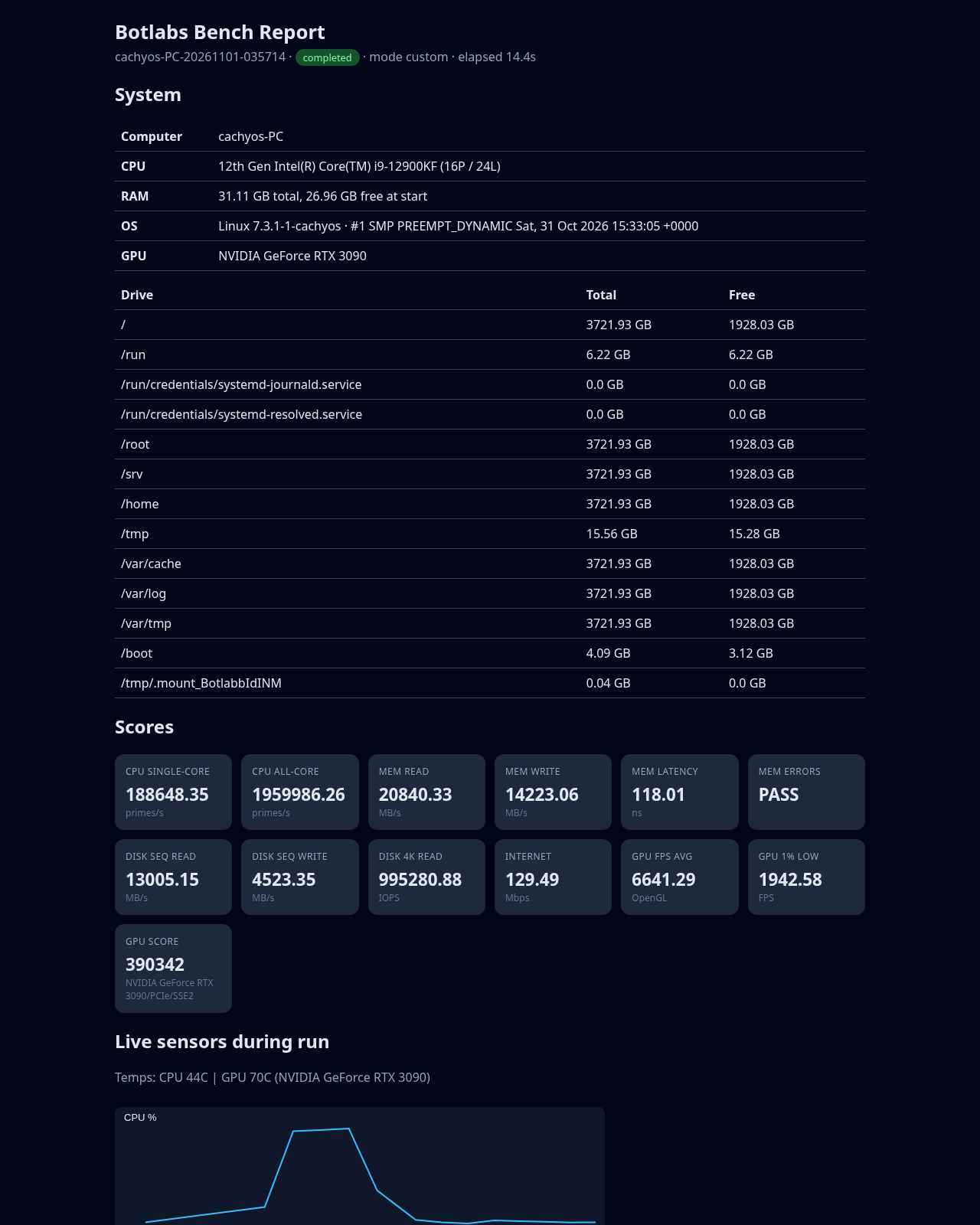
Example HTML report from a CachyOS run (v1.1.0):
Sample report image not available yet.